
The order has gone through. Your new customer is looking at the thank you page, with an order number, a delivery estimate and a few seconds of attention to spare.
By now, your ad platforms have logged whatever they could see: a click on a Meta ad, a Google search for your name or nothing at all.
None of them saw the podcast host who mentioned you last month, or the friend who dropped your link in a group chat. Your customer did, though. And the thank you page is the one point in the journey where you can simply ask them.
That's the job of a "How did you hear about us?" survey. Below, we cover where to put the question, how to word it and which answers to offer, the follow-up questions worth adding and how to read the results, including what they can't tell you.
Why ask "How did you hear about us?" after checkout?
A "How did you hear about us?" question gives you the buyer's own account of how they found you, including the channels your tracking can't see.
Ad platforms, Google Analytics and UTM tags record clicks. A podcast ad, a creator's video, a visit to a store or a tip from a friend usually doesn't produce a click, so the order lands in your reports as direct traffic or a search for your brand name.
Asking right after checkout ties each answer to a real order, so you can see what the customer spent and whether it was their first purchase. It also catches them while the purchase is fresh, so they're more likely to remember what brought them to you.
That's what makes the answers useful for working out CAC by channel, especially for channels that never send a click.
Where to put the survey
The thank you page should be your default, with a follow-up email or text as the backup. It also matters which customers see the question.
The thank you and order status pages
The thank you page, and the order status page customers come back to later, are the best places for the question. Fairing, which makes post-purchase survey software, recommends putting the survey at the top of both pages and turning off any pop-ups there, so the survey is the first thing a customer sees.
On Shopify, apps that customize the thank you and order status pages work on the Basic plan and up, according to Shopify's help center. You don't need Shopify Plus.
Because the question appears after payment, it adds nothing to checkout. If you've spent time cutting fields from your checkout, the survey doesn't put any back.
A follow-up email or text
An email or text sent after the order can reach customers who skipped the question on the thank you page. It's a weaker place to ask, though.
Fairing's guide to these surveys warns that email and SMS follow-ups carry "a significant risk of recency bias", especially when they go out more than 24 hours after the order. The longer the gap, the more likely a customer is to name the last thing they saw rather than whatever first brought them to you.
So treat email as a backup for people who didn't answer, not the main place to ask. A one-question link in a post-purchase email you already send to new customers is enough.
First-time and returning customers
Show "How did you hear about us?" to first-time buyers. A returning customer found you before their first order, and their answer says little about the order they just placed.
Fairing suggests two separate questions: "How did you hear about us?" for new customers and "What led you to our store today?" for returning ones. KnoCommerce, another post-purchase survey app, also recommends showing their attribution survey to first-time customers.
How to word the question and the answer options
The wording of the question and the list under it decide how far you can trust the answers.
The question
Keep the question plain. In Fairing's experience, "How did you hear about us?" consistently does better than formal wording such as "Please select your initial point of brand exposure."
KnoCommerce's template asks "How did you first hear about us?", and the word "first" points the customer to the start of their journey rather than the ad they clicked today.
Make it a single-answer question. If customers can tick every option, you get a pile of equal answers and no idea which one mattered.
Ask for the main source. The Pew Research Center avoids "select all that apply" questions in their own surveys, because forced-choice questions tend to give more accurate answers.
How many answer options to offer
Offer enough options that most customers see their answer, but few enough that the whole survey fits on screen without scrolling.
The number of options doesn't seem to change how many people answer. In Fairing's data on option counts, the response rate on the first question of a survey stayed between 30% and 50% whatever the number of options.
That means the screen sets the limit, not the customer's patience. Check the survey on a phone, because that's where the list runs out of room first.
A starting list you can copy
KnoCommerce publishes the options from their template question in their help center. It's a good base to start from.
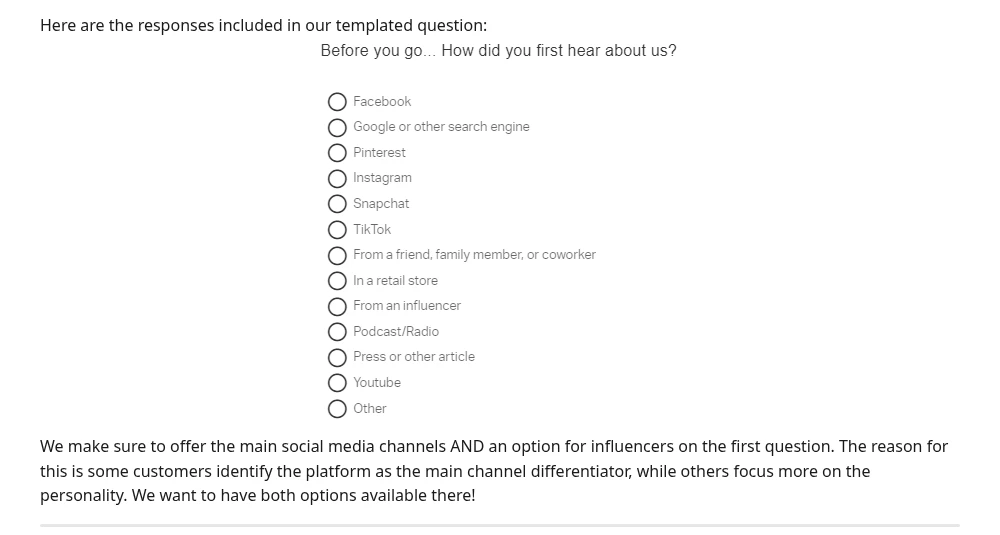
The template keeps the platforms and "From an influencer" side by side on purpose. KnoCommerce explains that some customers remember the platform, while others remember the person.
Here's a list adapted from that template, which suits most Shopify brands:
- TikTok
- YouTube
- Google or another search engine
- A podcast
- A creator or influencer
- A friend, family member or coworker
- An article or review
- In a store
- ChatGPT or another AI assistant
- Other (with a text box)
Take out the channels you don't use, and add new ones as you start paying for them. There's no harm in a longer list as your spending spreads.
The AI assistant option earns its place because a recommendation from ChatGPT or a similar tool doesn't show up in your dashboards.
Randomizing the order, with "Other" last
People tend to pick options near the top of a list. Pew calls this a primacy effect in surveys people fill in themselves, and the Nielsen Norman Group says the options at the start and end of a list are the most likely to be chosen.
The standard fix is to show the options in a random order to each customer. Keep "Other" at the bottom, where people expect to find it.
The "Other" box
Always include "Other" with a text box. It catches the channels you haven't listed, in your customers' own words.
Read the write-ins every month. If 10% or more of answers land in "Other", your list is missing something.
Some write-ins also name a specific show or person. A customer who types "Andrew Huberman's Podcast" can be filed under Podcast, with Huberman Lab as the show.
Follow-up questions for the channels you spend on
A follow-up question turns a broad answer into one you can act on. "Instagram" could mean your ad, a creator's post, your own account or a friend's share, and each of those comes out of a different budget.
KnoCommerce's template asks "Who posted about us?" after any social platform, with four options: "You did!", "I saw an ad", "An influencer I follow" and "It was in my feed/discovery section". For podcasts and creators, ask which one: follow "Podcast" with "Which podcast?", for example.
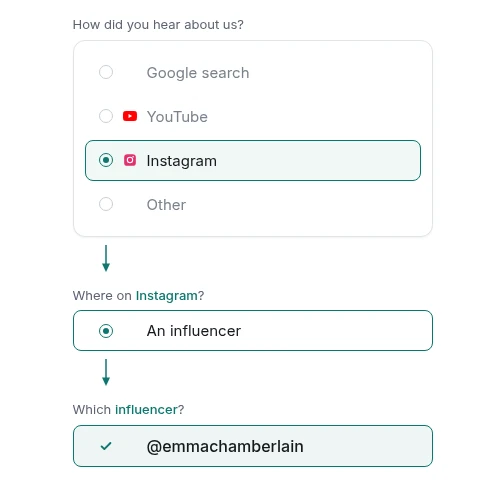
A follow-up doesn't put the first answer at risk. Fairing still records the answer to the first question if the customer skips the follow-up.
How to set up the survey on Shopify
On Shopify, the survey runs through an app. Fairing and KnoCommerce are two apps built for post-purchase surveys. With Fairing, the setup goes like this:
- Install the app and turn on a "How did you hear about us?" question for new customers.
- In Shopify's checkout editor, open the Thank you page and add the app's block, then do the same on the Order status page.
- Move the block to the top of both pages, and turn off any pop-ups there.
- Place a test order and check that the survey loads quickly on a phone.
Speed matters more than almost any other setting. Apart from pop-ups on the confirmation page, load time is the biggest lever on response rates. In Fairing's load-time data, surveys that load in under a second tend to get response rates above 60%.
30% to 50%
Response rate on the first survey question, whatever the number of answer options
Above 60%
Typical response rate for surveys that load in under one second
Fairing's survey waits for the confirmation page to finish loading, so keep other scripts and widgets on the thank you page to a minimum. Each one can hold the survey back.
If an older survey ran on your order status page through a pasted script, make sure it still appears. Shopify stopped running script tags on that page on August 28, 2025, for Plus stores, and on August 26, 2026, for every other store.
How to read the answers
Each answer is one buyer's memory, so the results are most useful as shares you watch over time and set beside the numbers you already have.
Tracking each channel's share over time
Look at each answer's share of new customers week by week or month by month, rather than as one running total. A share that climbs after a podcast run or a creator campaign is the signal you're looking for.
Decide ahead of time what change is worth acting on. As a starting point, you might agree that a channel named by 5% to 10% of buyers over 30 days is worth testing with more budget.
Comparing survey shares with what ad platforms report
Put each channel's share of answers next to the share of orders its own platform claims. A big gap is worth looking into, because each platform is grading its own results.
WorkMagic, which sells incrementality testing, compared four ways of measuring Meta's impact for one brand with nine-figure annual sales. Their analysis found that Meta reported 25% of the brand's orders, an incrementality test found 12%, the survey found 9% and click-based attribution found 6%.
Share of one brand's orders credited to Meta ads, by method (2024)
The survey landed much closer to the test than to Meta's own figure. It's a single brand, but it shows how a survey can check what a platform says about itself.
Fairing also has a report that lines up each answer with the last click Shopify recorded for the order. That shows you what customers in your "direct" traffic said, which is often where podcasts and word of mouth end up.
Using the answers for CAC and creative
Group revenue and new customers by answer, then set them against what you spent on each channel. That gives you a rough cost per new customer for channels with no click data, such as podcasts.
The write-ins and follow-ups help with creative, too. If buyers keep naming a creator or repeating a phrase, work it into your ad copy.
A large "friend or family" share tells you word of mouth is pulling its weight. The towel brand Weezie used their survey to attribute about 35% of their business to word-of-mouth referrals, according to Fairing's blog. That confirmed their investment in a referral program was paying off.
What the survey can't tell you
The answers are memories, not records. NN/g notes that people forget most details as time goes on and remember best what was recent or what they think about often. So customers name what stuck, which isn't always what reached them first.
Familiar platforms also get extra credit. David Vargas, writing for RevenueCat, saw no change in survey answers when a client started advertising through AppLovin, which places ads inside other apps, even though their tracking credited the campaign with about 200 conversions.
His explanation is that people who don't recognize where they saw an ad pick Meta, Google or TikTok, because those names are "a safe choice". He also expects answers to mirror your spend: if most of your budget goes to Meta, most answers will say Meta.
The survey only hears from people who bought and answered. It says nothing about shoppers who saw your ad and didn't buy.
And it doesn't prove cause. A customer who names a podcast might have bought anyway. To find out whether a channel brings orders you wouldn't otherwise get, you need an incrementality test.
Final thoughts
A "How did you hear about us?" survey is the simplest way to hear about the channels that don't leave a click. It's quick to set up, and it keeps collecting answers from every new customer after that.
How much weight you give it depends on where your money goes. If you spend mostly on one or two ad platforms, it's a quick check on whether they over- or under-report. If you spend on podcasts, creators or retail, it's often the only order-level read you'll get on them.
And if your budget is spread across many channels, use it alongside incrementality tests rather than instead of them.
Frequently asked questions
What's a good response rate for a "How did you hear about us?" survey?
A thank-you-page survey typically gets a response rate of 30% to 50% on its first question, according to Fairing's data. KnoCommerce reports a 45% average response rate across all their survey types. If yours is well below that, check load time and pop-ups first.
Should you offer a discount for answering the survey?
Offering a discount for answering usually isn't worth it. Fairing doesn't recommend incentives, because they can bias the answers. The thank you page already gets plenty of responses without one.
Can you make the "How did you hear about us?" question required?
Fairing doesn't let you make their thank-you-page questions required. Instead, a customer who skips a question sees it again on their next order. Don't move it into checkout as a required field, because that adds a step before payment.
Should you ask the question in your physical stores too?
Asking in your stores is worth it if you sell there. Fairing can show the same question on Shopify POS as well as online, according to their docs on display surfaces, so in-store and online answers end up in one report.
Should the question be multiple choice or open text?
The question works best as multiple choice with an "Other" box. Open text on its own leaves you with the same channel typed in many different ways. A fixed list plus "Other" gives you clean shares and still catches new channels, as covered under the "Other" box.