
Brands that sell online and in physical stores need both channels working from the same data. When a product sells at the counter, the website should know it's gone. When a customer who usually shops online walks into a store, staff should be able to see their order history and reward points.
Adobe Commerce, formerly Magento, runs the online side for many of these retailers, but it doesn't come with a point-of-sale system of its own. You have to choose a POS that connects to it, either one built for the platform or one linked through a connector.
This guide covers what an Adobe Commerce POS is, the features to look for, how the two kinds of integration work and which retailers each one suits.
What is an Adobe Commerce POS?
An Adobe Commerce POS is a point-of-sale system that connects an Adobe Commerce online store with physical locations. It works as a real-time bridge between your ecommerce operations and your stores, keeping products, inventory, orders and customer data in sync.
What is Adobe Commerce?
Adobe Commerce is the ecommerce platform formerly known as Magento, and it's part of Adobe Experience Cloud. It gives businesses the flexibility to build, customize and scale their online stores.
It comes in three editions:
- Adobe Commerce: the premium edition, with advanced features for mid-size and large businesses
- Magento Open Source: the free, highly customizable edition
- Adobe Commerce Cloud: a fully managed, cloud-based version built for scalability and performance
What does a POS system do?
A point-of-sale (POS) system is where in-store sales happen. It used to mean a cash register. Today's POS systems also handle inventory tracking, customer profiles, loyalty programs and reporting, which makes them the digital backbone of in-store operations. They process transactions quickly while keeping store data accurate and centralized. Our guide to what a POS system is covers the parts, types and costs in more detail.
How does an Adobe Commerce POS connect the two?
Unlike Shopify, Adobe Commerce doesn't have its own POS. Point-of-sale systems for the platform are developed by Adobe's solution partners.
An Adobe Commerce POS is designed to work with every Magento and Adobe Commerce edition, including Magento Open Source, Adobe Commerce and Adobe Commerce Cloud. It connects your online store with your physical locations so data flows between them in real time.
When a product sells in a store, for example, the inventory level updates in the Adobe Commerce backend and the website reflects the change straight away. Customer profiles, order history and pricing rules stay consistent across channels too. The result is a single source of truth for your operations, with no duplicate data entry or manual syncing.
What features should an Adobe Commerce POS have?
An Adobe Commerce POS should give retailers what they need to run their online and in-store operations together. If you're evaluating one, check that it covers the features below.
Real-time inventory sync
A good POS updates inventory levels between your online store and your physical locations instantly and accurately. That prevents overselling and gives staff and customers stock information they can trust.
Unified order management
Unified order management lets you handle every order from one system, whether it was placed in a store, online or through a mix of channels. That makes it easier to offer options such as buying in store and shipping from a warehouse, or buy online, pick up in store (BOPIS), and to handle returns and exchanges across channels.
Customer profiles and loyalty programs
The POS should sync customer profiles across every channel, including purchase history, reward points, gift cards and store credit. Store staff can then recognize an online customer at the counter, and a shopper can earn points on your website and spend them in a store. That shared view lets you personalize service and run targeted promotions that improve customer retention and repeat purchases.
Multi-store and multi-warehouse support
A good Adobe Commerce POS keeps working smoothly however many stores and warehouses you have. You can manage inventory, pricing and orders for each location while keeping central control and visibility in the Magento backend.
Payment flexibility
The POS should accept a range of payment methods, including cash, credit and debit cards, split payments, mobile wallets and buy now, pay later. It should also integrate with external payment processors for local and international payments. Offering more ways to pay speeds up checkout, keeps customers happy and improves conversion at the point of sale.
Offline mode
Offline mode matters if you sell at pop-up shops, trade shows or events. It lets staff keep processing transactions when the internet connection drops, and the system syncs the offline data automatically once the connection is back.
Reporting and analytics
The POS should include dashboards and reports on sales performance, inventory movement, product trends and individual stores. They help decision-makers make data-driven choices that improve operations and increase revenue.
How does an Adobe Commerce POS integration work?
An Adobe Commerce POS integration creates a two-way data flow, so changes made in a store show up online and changes made online show up in the store. The connection runs through APIs, modules or extensions that let the POS and Adobe Commerce communicate in real time, keeping inventory, orders and customer data consistent across both channels.
There are two types of Adobe Commerce POS on the market:
- Native POS: a POS built for Adobe Commerce that uses the platform as its central hub, also called a Magento-native POS
- Non-native POS: an in-store or standalone POS that needs a connector to link it to Adobe Commerce
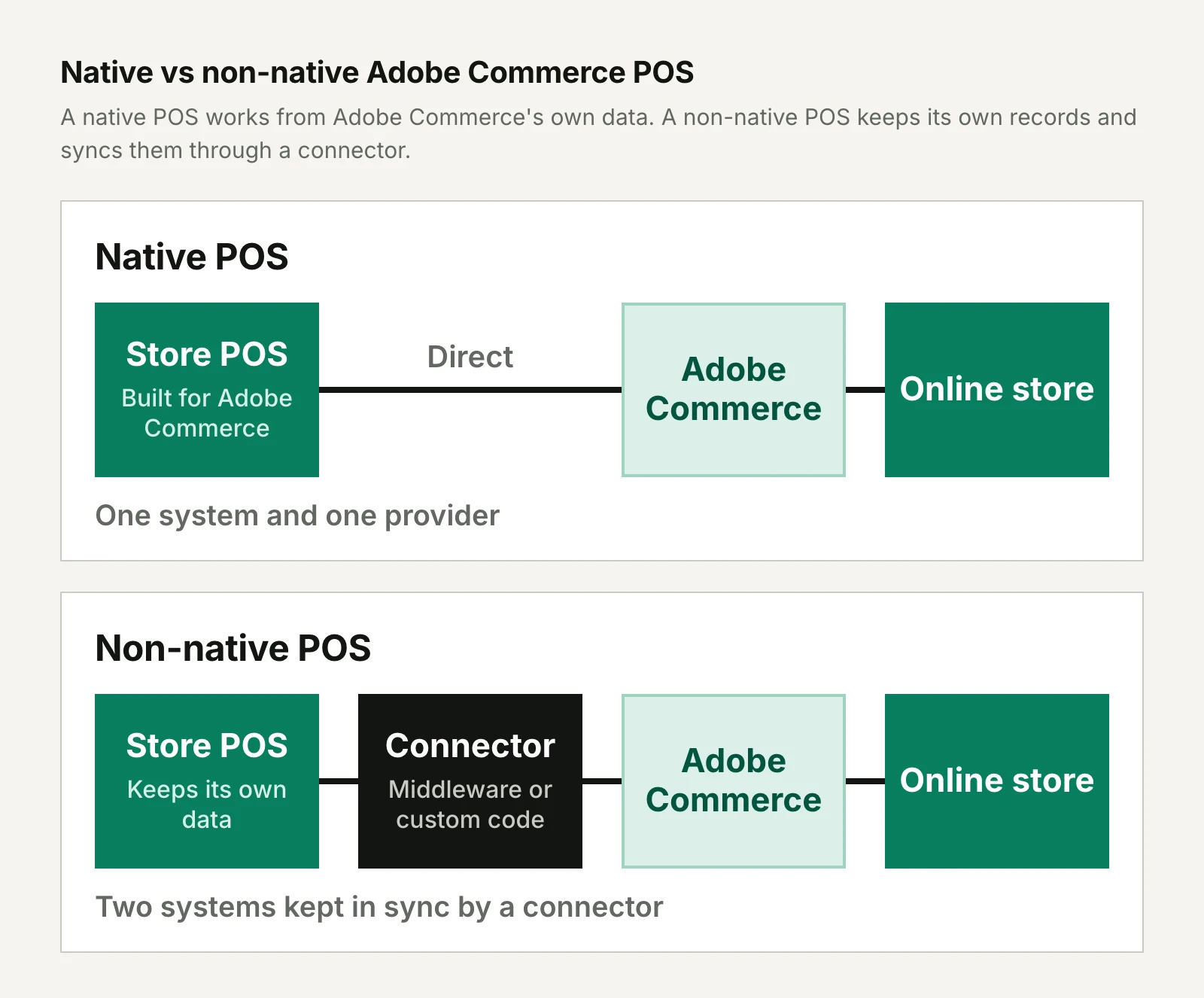
Native Adobe Commerce POS
Adobe Commerce doesn't include a POS by default, and native POS systems fill that gap. They're built exclusively for Magento and Adobe Commerce rather than relying on connectors or middleware. A native POS communicates directly with the Adobe Commerce database, which makes the integration stable.
Magestore is one example. Unlike other POS systems, Magestore POS is closely aligned with Magento's structure and logic, so retailers can run their omnichannel operations from a single platform.
The main advantages of a native POS are:
- Seamless integration: information flows automatically between online and in-store channels, with no double data entry or manual syncing.
- A single source of truth: Adobe Commerce is the central hub for products, orders, inventory and customer data, so every touchpoint shows the same information.
- Better performance: the direct database connection reduces data conflicts and sync delays and removes the dependence on third-party middleware.
- Compatibility with every edition: the POS works with both Adobe Commerce editions, Open Source and Enterprise, so it suits businesses of different sizes.
- Lower integration costs: connecting directly to the platform avoids the extra cost of third-party connectors or middleware.
- One provider for support: you work with a single vendor, which simplifies communication and makes support quicker than when several vendors are involved.
Non-native POS connected through middleware
Many businesses already use third-party POS platforms such as Clover, Lightspeed or Square and want to keep them. To connect those systems to an Adobe Commerce site, they need an Adobe Commerce POS integration service.
These are non-native POS systems because they weren't built for Adobe Commerce. Some work only as an in-store POS, while others are standalone systems that connect to many platforms through connectors. Businesses usually link them to Adobe Commerce with API connectors, middleware or custom code that syncs data between the two systems. Our guide to connecting a POS to your ecommerce store covers how to decide which system owns which data.
Lightspeed Retail, Retail Pro and Microsoft Dynamics 365, for example, are integrated with Adobe Commerce through middleware connectors such as Patchworks and 247 CloudHub Multichannel Connector.
A non-native POS has two main advantages:
- You keep your existing systems: retailers can carry on with their current POS without replacing hardware or retraining staff.
- Access to specialized features: some third-party POS systems offer hardware options or advanced features that suit particular business models.
It also brings some challenges:
- Data duplication or delays: if the integration isn't seamless, you may see double entry, sync lags or inconsistent data.
- More maintenance and complexity: connectors and middleware often need ongoing technical support, which adds cost.
- Several vendors to deal with: when something goes wrong, troubleshooting can involve more than one vendor, which leads to delays and higher operating costs.
Native vs non-native POS: which should you choose?
The choice between a native and a non-native Adobe Commerce POS comes down to your business strategy and the systems you already have.
| Native POS | Non-native POS | |
|---|---|---|
| How it connects | Directly to the Adobe Commerce database | Through API connectors, middleware or custom code |
| Where the data lives | In Adobe Commerce, the central hub | In two systems that a connector keeps in sync |
| Integration costs | No third-party connectors or middleware to pay for | Connectors and middleware add setup and maintenance costs |
| Support | One provider | The POS vendor, the connector provider and possibly your developers |
| Best suited to | Retailers that want Adobe Commerce at the center of everything | Retailers committed to an existing POS such as Lightspeed or Square |
If you want Adobe Commerce to be the central hub for all your products, inventory and customer data, a Magento native POS is the best choice for a unified experience. If you've already invested in a specific POS platform and want to connect it to Adobe Commerce without replacing it, a non-native POS may be the more practical option.
Who should use an Adobe Commerce POS?
An Adobe Commerce POS suits omnichannel brands, which need to connect their stores and their website but often find it hard. It gives retailers the infrastructure to offer one shopping experience, streamline operations and scale.
It's a strong fit for:
- Retailers with online and physical stores: they can sync inventory, orders and customer data in real time, so every channel offers a consistent experience.
- Businesses with several branches or warehouses: the POS centralizes operations, which makes complex logistics easier to manage and keeps stock levels accurate across locations.
- Brands that want one customer experience: connecting online and in-store data lets you recognize customers wherever they shop, build stronger loyalty and personalize each interaction.
Final thoughts
If your business already runs on Adobe Commerce or Magento Open Source, adding a Magento 2 POS is the natural next step toward operating as one omnichannel retailer. A customer who shops in both places is then treated as one customer, with one order history and one set of rewards.
Whether you choose a native system like Magestore POS for a direct integration or connect a non-native POS you already use, an Adobe Commerce POS gives you the flexibility to grow. If you're still weighing your options, read reviews of Adobe Commerce POS systems and compare how each one fits the way your stores operate before you decide.
Frequently asked questions
Does Adobe Commerce have a built-in POS?
Adobe Commerce doesn't have a built-in POS, unlike Shopify. Point-of-sale systems for the platform are developed by Adobe's solution partners, either as native systems built for Adobe Commerce or as third-party systems connected through middleware.
What's the difference between a native and a non-native Adobe Commerce POS?
A native Adobe Commerce POS is built for the platform and communicates directly with its database, while a non-native POS is a separate system linked to Adobe Commerce through connectors, middleware or custom code. A native POS keeps all your data in Adobe Commerce, and a non-native POS lets you keep a system you already use.
Can you keep your current POS with Adobe Commerce?
You can keep a third-party POS such as Clover, Lightspeed or Square with Adobe Commerce by connecting it through an integration service, API connectors or middleware. Expect ongoing maintenance for the connection and more than one vendor to deal with when something goes wrong.
Does an Adobe Commerce POS work with Magento Open Source?
An Adobe Commerce POS is designed to work with every Magento and Adobe Commerce edition, including Magento Open Source, Adobe Commerce and Adobe Commerce Cloud.
Can an Adobe Commerce POS work without an internet connection?
An Adobe Commerce POS with an offline mode keeps processing transactions when the internet connection drops, then syncs the data automatically once it's back. It's worth checking for if you sell at pop-up shops, trade shows or events.