The moment an online brand opens a shop, runs a pop-up or takes a stall at a market, it needs a point-of-sale (POS) system. Taking payment is the easy part, since almost any POS can ring up a sale and take a card.
The harder part is what happens to the sale afterward. Your POS decides whether a sale at the counter updates the same stock count and customer record as your website, or sits in a separate system where the customer looks like a stranger. Get it wrong and your website sells stock that's already gone, and your best online customers go unrecognized when they visit in person.
This guide explains what a POS system is and does, how a sale moves through one, the main types, how POS systems work with ecommerce platforms, what they cost and how to choose one.
What is a POS system?
A POS system is the software and hardware a business uses to ring up sales in person, take payment and record what was sold. POS stands for point of sale, the place and moment a purchase is completed.
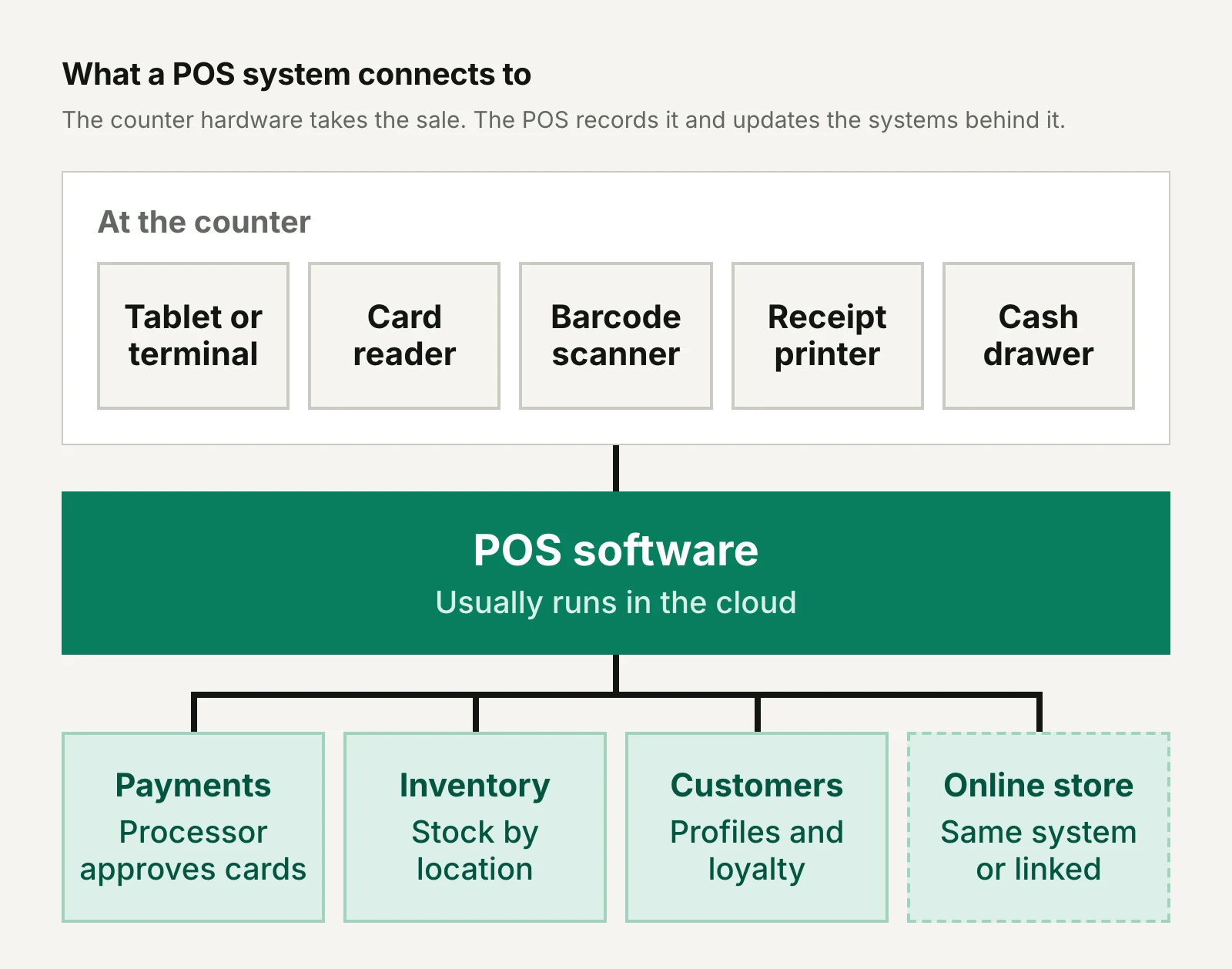
The software runs on a tablet, phone or dedicated terminal. It works with hardware at the counter, such as a card reader, and with the systems that keep track of payments, stock and customers. For a brand that also sells online, one of those systems is the ecommerce platform.
What hardware does a POS system need?
The hardware a POS system needs depends on how you sell, and a phone with a card reader is enough to start. A full counter setup usually includes:
- A tablet, phone or terminal to run the POS software. Some terminals have a card reader and receipt printer built in.
- A card reader for chip, tap and swipe payments.
- A barcode scanner to add items quickly and count stock.
- A receipt printer, unless you send receipts by email or text.
- A cash drawer if you take cash.
Larger counters often add a customer-facing screen, a label printer or a scale for goods sold by weight.
What does a POS do besides take payments?
Beyond taking payments, a modern POS runs much of a store's day-to-day work:
- Inventory: tracks stock at each location, flags low stock and records counts and transfers.
- Customer profiles: attaches a sale to a named customer, with their contact details and purchase history.
- Loyalty: awards and redeems points or rewards, either built in or through an app.
- Gift cards and store credit: sells and redeems balances, ideally the same ones customers use online.
- Returns and exchanges: finds the original order and refunds to the card, in cash or as store credit.
- Staff: gives each person a login and sets what they're allowed to do, such as giving discounts.
- Reporting: shows sales by product, location, staff member and time of day.
How does a POS system work?
A POS system works by looking up each item, totaling the sale, sending card payments to a processor for approval and then updating stock and customer records. In a typical in-store sale:
- Items go in. Staff scan barcodes or tap products on screen, and the POS pulls each price from the product catalog and adds tax.
- The customer is identified. Staff look the shopper up by email address or phone number, or create a new profile, which links the sale to their history, rewards and any store credit.
- Discounts apply. The POS applies promotions, loyalty rewards or gift card balances.
- The customer pays. For a card or phone payment, the reader sends encrypted card details to the payment processor, which asks the card network and the customer's bank to approve it. Cash goes in the drawer.
- A receipt goes out, printed or sent by email or text.
- Records update. Stock falls at that location, the sale appears in reports and on the customer's profile and a connected online store sees the new stock level.
The second step is the easiest to skip at a busy counter. It also happens to be the most relevant part for a brand that sells both online and in-store, as it's where your customer profiles become truly integrated across the different channels you sell on.
What are the different types of POS system?
The main types of POS system are traditional on-premises systems, cloud POS, mobile POS and self-service kiosks. The labels overlap: "cloud" describes where the software and data live, while "mobile" and "kiosk" describe the device, and most mobile and kiosk setups run cloud software.
| Type | Where the software runs | Typical hardware | How you pay | Best suited to |
|---|---|---|---|---|
| Traditional on-premises (legacy) | Computers or a server in each store | Fixed registers wired to scanners, printers and drawers | Upfront licenses and hardware, plus support contracts | Established chains with IT teams and systems built around them |
| Cloud POS | The vendor's servers, over the internet | Tablets, phones or terminals | A monthly subscription per location or register | Most new stores, especially brands that want store and online data in one place |
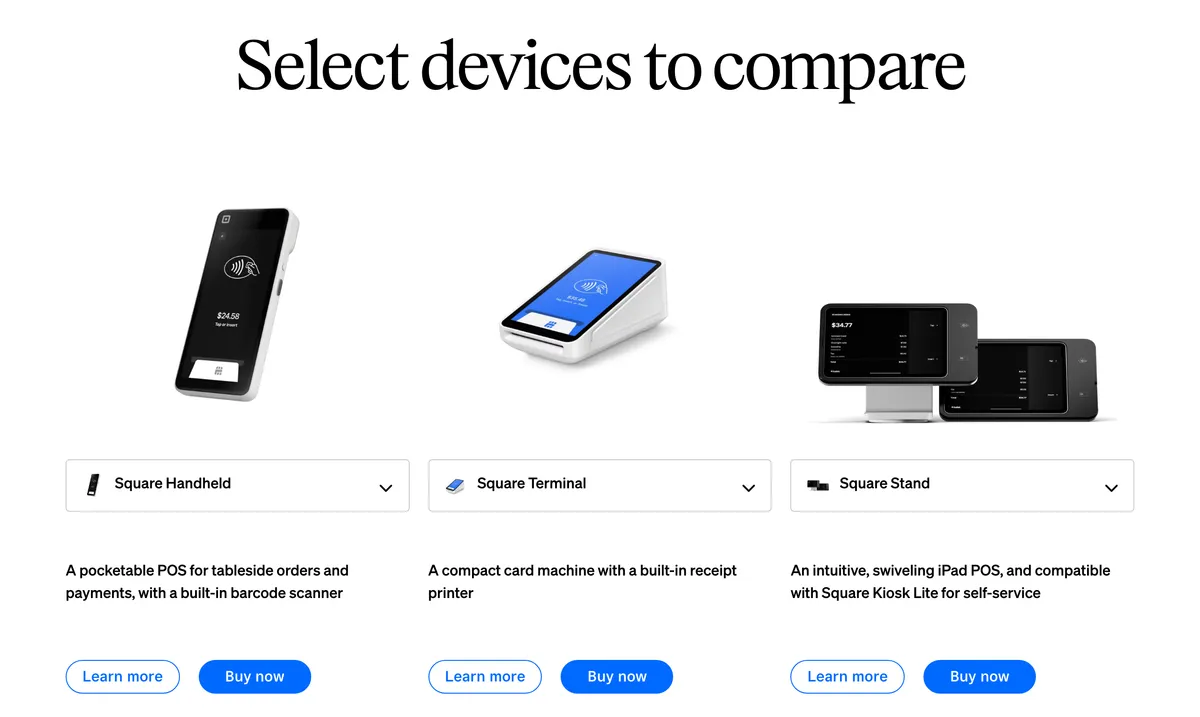
| Mobile POS (mPOS) | Cloud software on a phone, tablet or handheld | A phone or handheld with a card reader | Low hardware costs plus a subscription or processing fees | Pop-ups, markets, events and taking payment on the shop floor |
| Self-service kiosk | Cloud software on a touchscreen customers use | A kiosk screen with built-in payment | Hardware plus a software fee per device | Busy counters with simple, repeatable orders |
What is a cloud POS?
A cloud POS keeps its software and data on the vendor's servers instead of a computer in the shop, so every register and location works from the same records and you can check sales and stock from anywhere. Shopify POS and Lightspeed Retail both describe themselves as cloud-based.
Compared with an on-premises system, a cloud POS updates itself and costs a monthly subscription instead of upfront licenses. The tradeoff is its reliance on an internet connection, so check what it can still do offline.
What is a mobile POS (mPOS)?
A mobile POS, or mPOS, runs on a phone, tablet or handheld, so staff can take payment wherever the customer is. It's ideal for pop-ups, markets and events, and for shortening the queue in a busy store by checking customers out on the shop floor.
Most are the same cloud software as the counter version on a smaller device. Square sells a card reader for $59 and a Handheld device for $399, and Clover's Flex is a handheld with a built-in receipt printer.
When does a self-service kiosk make sense?
A self-service kiosk makes sense when customers order simple, repeatable items and the queue is the bottleneck, as at food counters and cafés. Square's Kiosk costs $1,999 including a counter stand, and its kiosk software adds $99 a month per device on the Plus or Premium plans.
Where shoppers want advice or a fitting room, as in most fashion and beauty stores, a kiosk is best suited to taking pressure off staffed checkout rather than replacing it.
Traditional on-premises POS systems
Traditional on-premises systems, often called legacy POS, run on computers or servers in each store. They don't depend on the internet to run the register itself and can be heavily customized, but updates, backups and security fall to your own IT team.
Getting their data to match your website is usually a separate integration project. If you inherit one, you need to ask yourself the question whether connecting it to your online store will cost more than replacing it. Our guide to connecting a POS to your ecommerce store goes into this further.
Does your ecommerce platform come with a POS?
Some ecommerce platforms come with a POS of their own, while others rely on standalone systems that you connect. The difference decides whether your store and website share one set of products, stock and customers from the start or need a connector to keep two sets in sync.
| Platform | POS of its own? | Read more |
|---|---|---|
| Shopify | Yes: Shopify POS is included with paid plans, and POS Pro adds features for permanent stores | How to choose a POS for Shopify |
| WooCommerce | A POS tab in the WooCommerce mobile app that syncs inventory, customer and order data with the store, alongside third-party plugins and systems | How to choose a WooCommerce POS |
| Adobe Commerce (Magento) | No: POS systems come from Adobe's partners, either built for the platform or connected to it | How to choose an Adobe Commerce POS |
It works the other way too. Square's free plan includes a basic website or online store, and Lightspeed Retail plans include built-in Lightspeed eCommerce, so a business that started in store can add online sales on the same system. Standalone systems such as Clover and Lightspeed can also connect to a separate ecommerce platform.
Why does the POS matter if you also sell online?
For a brand that also sells online, the POS decides whether in-store shoppers become known customers you can reach again or stay anonymous transactions. Your website collects an email address with almost every order. A store counter only does when the POS and the staff are set up to ask.
Capturing customer details at the counter
Capturing an email address or phone number at the counter is what turns an in-store sale into a customer record. The natural moments are offering a digital receipt and checking whether the shopper has rewards to use.
Ask separately whether they'd like marketing emails or texts, rather than treating a receipt address as a sign-up, so the people who say yes can join the same email, SMS and push program as your online subscribers.
One customer profile across channels
One customer profile across channels means the store can see online orders and the website can see store purchases, so each customer is counted once. Without it, someone who buys online in March and in store in October looks like two occasional shoppers, which understates both your retention and your customer lifetime value.
A shared profile also helps staff: they can see a returning customer's size or the product they reorder. All-in-one systems have the edge here, and Shopify's POS Pro, for example, adds rich customer profiles and lifetime value reporting at each location it covers.
Loyalty, gift cards and store credit in store
Loyalty points, gift cards and store credit work best when customers can spend them wherever they shop with you. Support varies by system.
Square includes a loyalty program in its Plus plan, and Lightspeed Retail's Core and Plus plans include in-store and online loyalty. Clover's Retail Growth plan includes a loyalty program and gift cards.
Shopify POS has no built-in loyalty tools, so Shopify stores add an app (our Shopify loyalty program guide compares the main ones), though Shopify's own store credit can be spent online, in POS and in Shop.
Buy online, pick up in store and returns
Buy online, pick up in store (BOPIS) and in-store returns of online orders both depend on the POS being able to see online orders. When it can, a customer collects or returns an online order at the counter and the stock and refund land in the right place.
Shopify, for example, lists BOPIS among POS Pro's omnichannel features. Its included POS features accept returns only at the original purchase location, while POS Pro accepts returns and exchanges at any location.
How much does a POS system cost?
A POS system costs a software subscription, the hardware and a processing fee on every card payment, and once sales pick up, processing is usually the biggest of these costs. Software runs from free to a few hundred dollars a month per location. Hardware runs from $59 for a card reader to around $2,000 for a kiosk or a full counter, and in-person card rates at the main flat-rate providers range from 2.3% to 2.6% plus 10 to 15 cents.
| POS (US prices, October 2026) | Software | In-person card rate | Hardware |
|---|---|---|---|
| Square | Free plan $0; Plus $49 and Premium $149 a month per location | 2.6% + 15¢ on Free, 2.5% + 15¢ on Plus, 2.4% + 15¢ on Premium | Reader $59, Terminal $299, Handheld $399, Register $899, Kiosk $1,999 |
| Shopify POS | Included with Shopify plans from $39 a month (Basic, billed monthly); POS Pro $89 a month per location, billed yearly | From 2.6% + 10¢ on Basic to 2.4% + 10¢ on Advanced, with Shopify Payments | A phone or tablet plus a Shopify card reader |
| Lightspeed Retail | Basic $89, Core $149 and Plus $289 a month billed annually ($109, $179 and $339 month to month), each with one register | Not published on its US pricing page | Priced separately |
| Clover retail systems | Sold with hardware: the Standard system costs $1,899 plus $84.95 a month, or $180 a month for 36 months | 2.3% + 10¢ on Standard, 2.6% + 10¢ on Basic | Standard: Station Duo with customer screen, receipt printer and cash drawer; Basic: compact terminal for $349 |
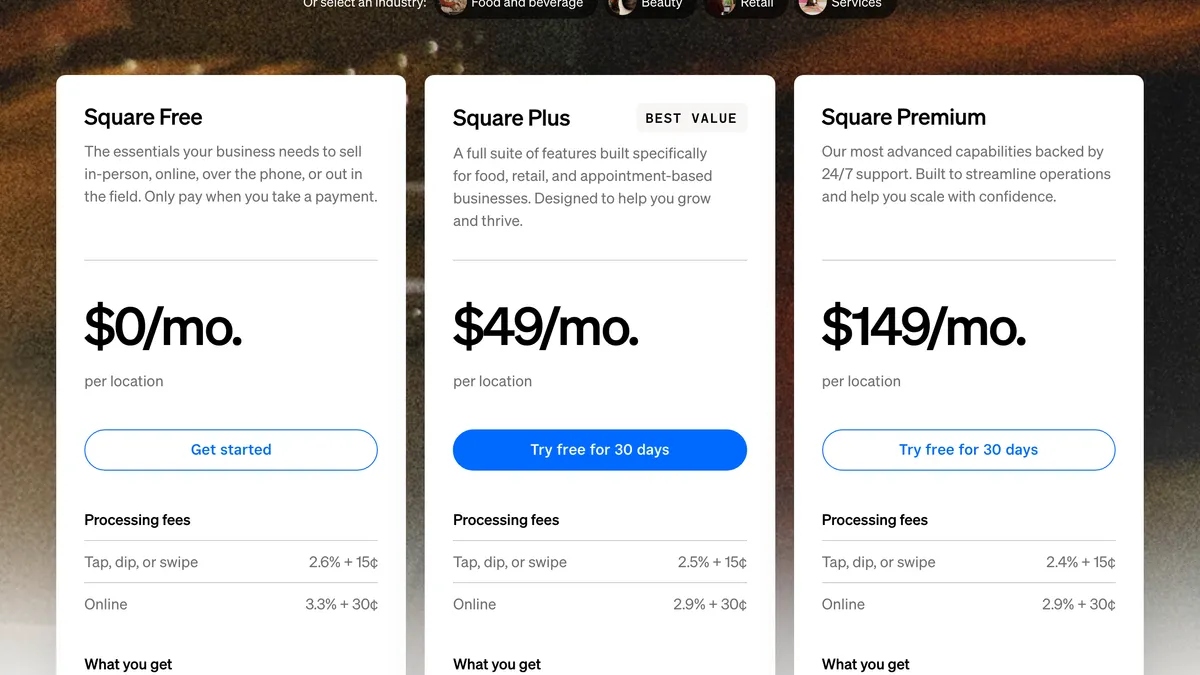
Processing is the cost that grows with your sales. Take a store with $30,000 a month in card sales at an average of $60, or 500 payments. On Square's free plan, that's $780 in percentage fees plus $75 in per-payment fees, $855 a month, more than any monthly software fee in the table. Square Plus cuts the rate by 0.1 points, which saves $30 a month at that volume, less than its $49 fee, so the case for upgrading rests on its features, such as loyalty and staff management, rather than the lower rate.
Check the smaller fees too. Typing in card details costs 3.5% + 15¢ at Square and 3.5% + 10¢ at Clover. Larger merchants can ask for better rates: Square invites businesses processing over $250,000 a year to ask about custom pricing.
How to choose a POS system
The best way to choose a POS system is to start from how and where you sell in person, then check it against the records it needs to share with your online store. Before you sign, check:
- Platform fit: whether it comes with your ecommerce platform or has a proven connector for it, and which system will own products, stock and customers.
- Customer capture: how quickly staff can look up or add a customer, and whether profiles and order history match the ones online.
- Loyalty, gift cards and store credit: whether balances work in both channels without a workaround.
- Cross-channel orders: pickup of online orders, in-store returns of online orders and selling out-of-stock items for delivery (endless aisle).
- Hardware: what you already own, what the system supports and what it costs to equip a new location.
- Offline mode: what happens to sales and stock when the connection drops.
- Total cost: software per location and register, add-ons, hardware and processing at your real card volume, plus the contract term.
- Reporting and data: multi-location reports, staff permissions and how easily you can export your data if you switch later.
Which type of POS suits which business?
The right type of POS depends mostly on where you sell in person and whether your ecommerce platform already has a POS of its own.
| Your situation | A good starting point |
|---|---|
| An online brand on Shopify opening its first store | Shopify POS, with POS Pro for the permanent location |
| Pop-ups, markets and events alongside an online store | A mobile POS on a phone or handheld, with offline payments |
| An online store on WooCommerce or Adobe Commerce | A POS built for the platform, or a standalone system with a proven connector |
| A store-first business adding online sales | A POS with its own online store, such as Square or Lightspeed Retail |
| Several stores with large catalogs and staff teams | A cloud POS with multi-location inventory, staff permissions and stock transfers |
| Busy counters with simple orders | Self-service kiosks alongside staffed registers |
Shopify POS is a strong fit when your online store already runs on Shopify, because the store and website share one set of products and customers from day one. A standalone system makes more sense when you're committed to it already or need features your platform's POS lacks, as long as you budget for the connection.
Final thoughts
A POS is still judged at the counter first: it has to be fast, reliable and easy for staff to use. For a brand that also sells online, the bigger test comes after the sale, in whether the stock count, the customer's profile and their rewards update in the same place as your website's.
Start from the platform you already run and the way you sell in person. Price the whole system at your real card volume, and before you commit, test the moments that cross channels, such as a customer returning an online order in store.
Frequently asked questions
What's the difference between a POS system and a cash register?
A cash register records sales and holds cash, while a POS system also takes card payments, tracks inventory, keeps customer profiles and reports across locations. Many POS setups still include a cash drawer, so a modern counter can look like a register while doing much more behind it.
Can you use an iPad or phone as a POS?
You can use an iPad or phone as a POS by installing the vendor's app and pairing a card reader. With Tap to Pay on iPhone, apps including Square, Shopify, Clover and WooCommerce can also take contactless payments on the phone itself, without a separate reader. You'll still want a stand, a printer and a cash drawer for a permanent counter.
Does a POS system work without internet?
A cloud POS keeps working without internet only if it has an offline mode, and what it can do offline varies by vendor. Square, for example, includes offline payments on all its plans. Check whether card payments, refunds and stock updates work offline, and how long the system can run before it needs to reconnect.
Is a POS the same as a payment processor?
A POS and a payment processor aren't the same thing: the POS records the sale, while the processor moves the money from the customer's card to your bank account. Square, Shopify and Clover bundle both and quote their card rates alongside their software, which keeps setup simple but ties your rates to the POS you choose.
Do POS systems require a contract?
Some POS systems require a contract and some don't, so check the term before you buy hardware. Square says its plans have no locked-in contracts, Lightspeed charges less when you pay annually and Shopify bills POS Pro yearly. Clover offers its retail systems on 36-month payment plans, and its current online hardware offer requires a three-year contract.