For years, Olivia & Kate sold online through Shopify while its boutique in Haarlem rang up sales on a separate point-of-sale platform. According to Shopify's case study on the Dutch fashion label, customer and transaction data lived in different places, so a question about a customer's lifetime value or returns could mean building a full report and working out where the right data was.
That's the cost of running a shop and a website on separate systems, and it reaches the shop floor too. Unless something keeps the two in step, a jacket sold at the counter can still look available online, and someone who has bought from you on the web for years is a stranger at the till.
Olivia & Kate closed the gap by moving the boutique onto Shopify POS in April 2025. Other brands close it the other way, by keeping the Square, Clover or Lightspeed system their staff already know and connecting it to Shopify.
This guide helps you choose a POS for your Shopify store: what Shopify POS includes and costs, how those third-party systems connect, the features to check whichever way you go and which kind of store each route suits.
What are your POS options as a Shopify store?
A Shopify store can sell in person with Shopify POS, the point-of-sale app built into Shopify, or with a third-party POS such as Square, Clover or Lightspeed that an app or middleware connects to Shopify. That's the main difference from Adobe Commerce, which has no POS of its own, so every Magento merchant picks a partner system.
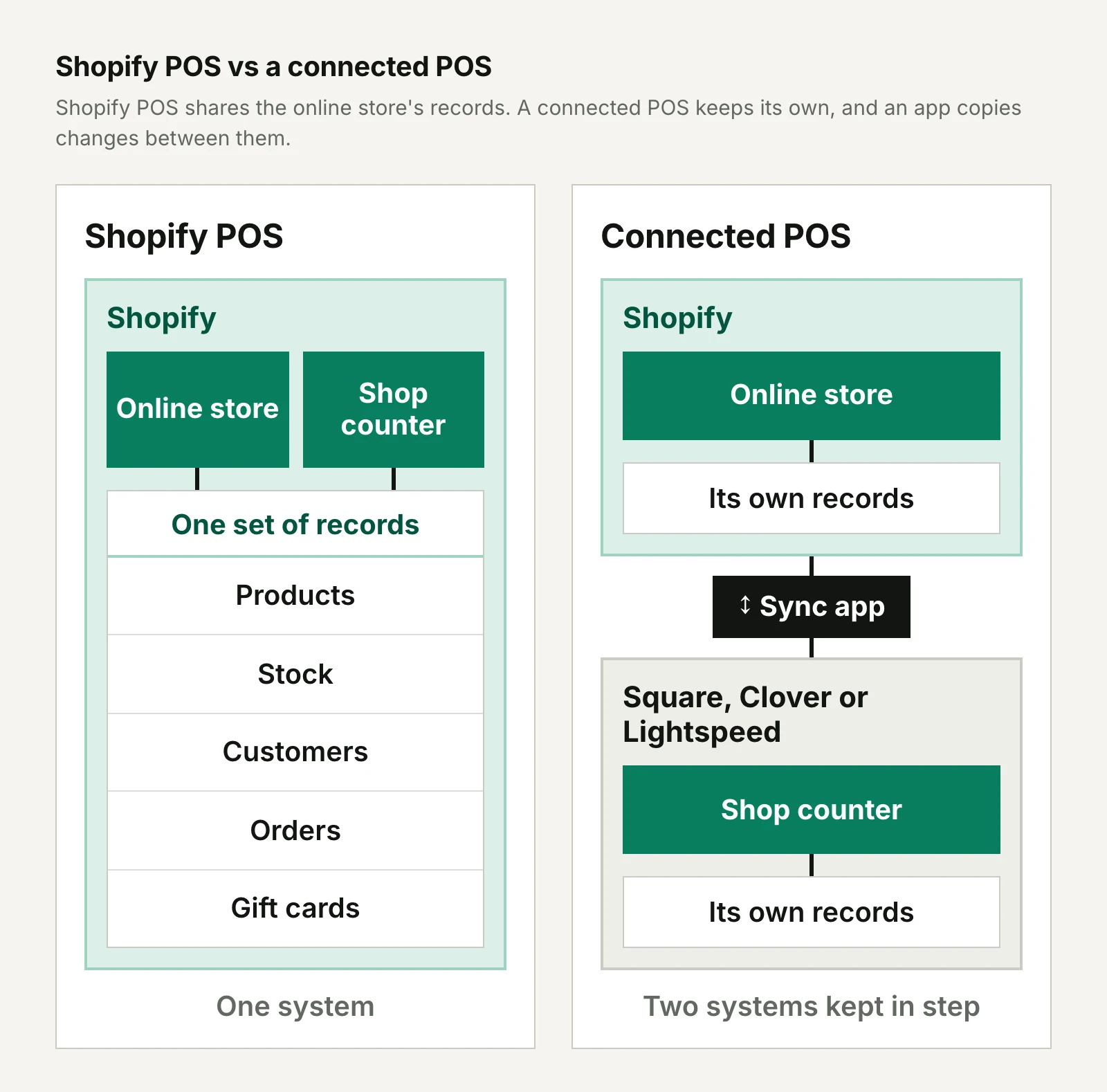
The two routes differ in where your data lives. Shopify POS is another sales channel on the same Shopify account as your online store, so a sale at the counter changes the same stock count and customer profile the website reads.
A connected POS keeps its own catalog, stock levels and customer list, and the app between the systems copies changes from one to the other.
Our guide to what a POS system is and how it works covers the basics of hardware, software and costs.
What does Shopify POS include?
Shopify POS is Shopify's own point-of-sale app for iOS and Android devices, and every paid Shopify plan includes its basic features at no extra cost. Because it syncs with your Shopify admin rather than keeping a separate database, the counter and the website share:
- Products and inventory: you manage the catalog once, and every plan includes multi-location inventory, order and customer management.
- Customer profiles: staff can add and edit profiles at the counter, and they're the same profiles your online store uses.
- Orders: sales from the shop and the website appear in one order list.
- Gift cards: customers can use a gift card at any location or online, and the balance updates across channels.
- Store credit: customers signed in through Shopify's newer customer accounts can spend store credit in your online store, in Shopify POS and in Shop.
What's the difference between POS Lite and POS Pro?
POS Pro is a paid upgrade for individual store locations, while the features every plan includes, which many guides still call POS Lite, are built for casual selling at pop-ups, markets and events. Shopify's help center comparison and POS pricing page set out the split:
| Included with every plan | POS Pro | |
|---|---|---|
| Price, October 2026 | No extra charge | $89 a month per location, billed yearly |
| Staff | POS access set by your Shopify plan | Unlimited POS-only staff, with roles and permissions |
| Customer profiles | Simple profiles | Rich profiles with lifetime value reporting and loyalty insights |
| Returns | At the original purchase location | Returns and exchanges at any location |
| Discounts | Discount codes and manual discounts | Adds automatic discounts |
| Fulfillment | Sell and take payment in store | Adds in-store pickup, ship to home and local delivery |
| Inventory | Change quantities, manage stock in the admin | Adds inventory counts, purchase orders, stock transfers and low-stock alerts |
| Reports | Shopify admin reports | Adds daily sales reports and in-app store analytics |
| Warranty on Shopify hardware | One year | Two years |
You add POS Pro location by location, so a brand with a flagship store and a weekend market stall can pay for it only at the flagship. Shopify Plus includes the first 20 POS Pro locations, and when a Plus merchant uses Shopify Payments as its main retail payment provider, Shopify waives the POS Pro fee for its first 200 retail locations.
How much does Shopify POS cost?
The cost of Shopify POS is your Shopify plan, plus POS Pro for any location that needs it, hardware and card processing fees on each sale. Here's what those came to in the US in October 2026:
| Item | US price, October 2026 |
|---|---|
| Basic plan | $39 a month, or $29 a month billed yearly |
| Grow plan | $105 a month, or $89 a month billed yearly |
| Advanced plan | $399 a month, or $359 a month billed yearly |
| Shopify Plus | From $2,300 a month, with 20 POS Pro locations included |
| POS Pro | $89 a month per location, billed yearly |
| Shopify Tap & Chip Card Reader | $49 |
| Shopify POS Terminal, a countertop terminal with a customer display | $349 |
| Verifone Victa Mobile, a handheld that runs Shopify POS and scans barcodes | $399 |
A small brand can start with less. Tap to Pay turns a supported phone into a card reader, and Shopify's hardware page says your own tablet, phone and existing accessories will work with Shopify POS in most cases.
Card processing comes on top: with Shopify Payments, in-person rates started at 2.6% + 10¢ on Basic, 2.5% + 10¢ on Grow and 2.4% + 10¢ on Advanced in October 2026.
Where does Shopify POS fall short?
Shopify POS's main limits are that its fuller retail features cost extra per location, it has no loyalty program of its own and its payments and hardware don't cover every country. Exchanges, in-store pickup and returns at any location all sit in POS Pro, so a brand that wants them in five shops pays $445 a month on top of its plan.
Loyalty needs an app. Shopify's own guide to POS loyalty programs, updated July 2026, says Shopify POS doesn't have built-in loyalty tools and points merchants to apps such as Smile.io and Marsello instead.
Shopify Payments and Shopify's POS hardware are available only in select regions, so check Shopify's list of supported countries before you plan around them.
When does keeping another POS make sense?
Keeping a third-party POS makes sense when your shops already run well on it and replacing it would cost more than connecting it, or when the business needs something Shopify POS isn't built for. Common reasons include:
- The shops are the bigger channel: staff are trained on the system, and it holds years of sales history and customer records.
- Hardware you're still paying for: Clover, for example, sells its retail systems on 36-month payment plans as well as outright.
- A different kind of business: Square sells point-of-sale software for restaurants and appointments as well as retail, while Shopify's POS industry pages are all retail categories.
- Payments: you sell in a country where Shopify Payments and Shopify's POS hardware aren't available.
The trade-off is that you run two systems. You pay for both, plus the connector, and someone has to decide which system owns each kind of data and watch the sync for errors.
Our guide to connecting a POS to an ecommerce store covers that data ownership, the sync approaches and what tends to go wrong.
How do Square, Clover and Lightspeed connect to Shopify?
Square, Clover and Lightspeed each connect to Shopify in a different way. Lightspeed publishes its own Shopify app, while catalog and stock sync for Square and Clover comes from third-party apps. Clover's own Shopify connection is a payments plugin.
| POS | How it connects to Shopify | POS price, US, October 2026 |
|---|---|---|
| Square | Third-party apps such as DPL Square Integration and SKU IQ | Free plan, or $49 (Plus) or $149 (Premium) a month per location |
| Clover | Third-party apps such as SKU IQ for products and stock; Clover's own plugin for online card payments | Retail systems from $16 a month over 36 months |
| Lightspeed Retail X-Series | Lightspeed's own Shopify app, or middleware such as Patchworks | $89, $149 or $289 a month billed annually, each with one register |
| Shopify POS | Built in | Included with every plan; POS Pro $89 a month per location |
Connecting Square to Shopify
Square connects to Shopify through apps from other developers. DPL Square Integration from Digital Product Labs is one that goes beyond stock: its listing says it syncs customer data and gift cards both ways, matches stock across multiple Shopify and Square locations by shared SKU and sends Shopify orders, refunds and cancellations to Square.
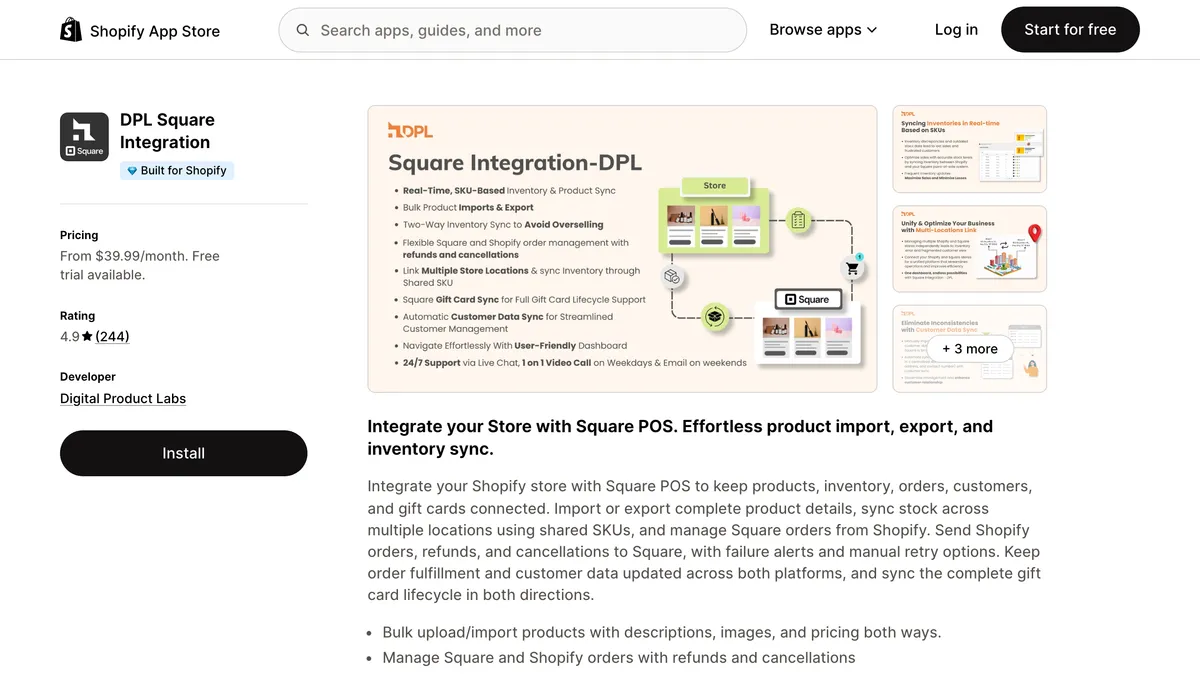
The plan limits are the detail to check. In October 2026, its $39.99 Silver plan synced up to 1,000 products and no orders. The $59.99 Gold plan raised that to 2,000 products and added 1,000 order syncs a month. Only the $99.99 Platinum plan included gift cards, capped at 500 syncs a month.
A store with 3,000 products needs the top plan just to sync its catalog.
Square's Plus plan includes a loyalty program that connects to Square's POS. If you also run a loyalty app on your Shopify store, decide which program is the real one before customers end up with two balances.
Connecting Clover to Shopify
Clover's own Shopify connection is the Clover Payments plugin, which lets a Shopify online store in the US or Canada take card payments through a Clover merchant account. It's free for Clover merchants.
Clover's documentation for it covers payments only, and because Shopify doesn't support surcharging, a Clover account that adds card surcharges can't connect.
Products and stock need a separate app. SKU IQ from o2oCommerce lists Clover, Lightspeed Retail and Square among the systems it works with.
In October 2026, its Shopify plans ran from $19 a month for stock quantities only to $99 a month for all product attributes and images, and the Shopify side was free for merchants who already had SKU IQ installed on their POS. Its listing describes inventory, order and catalog sync but doesn't mention customer data.
Connecting Lightspeed to Shopify
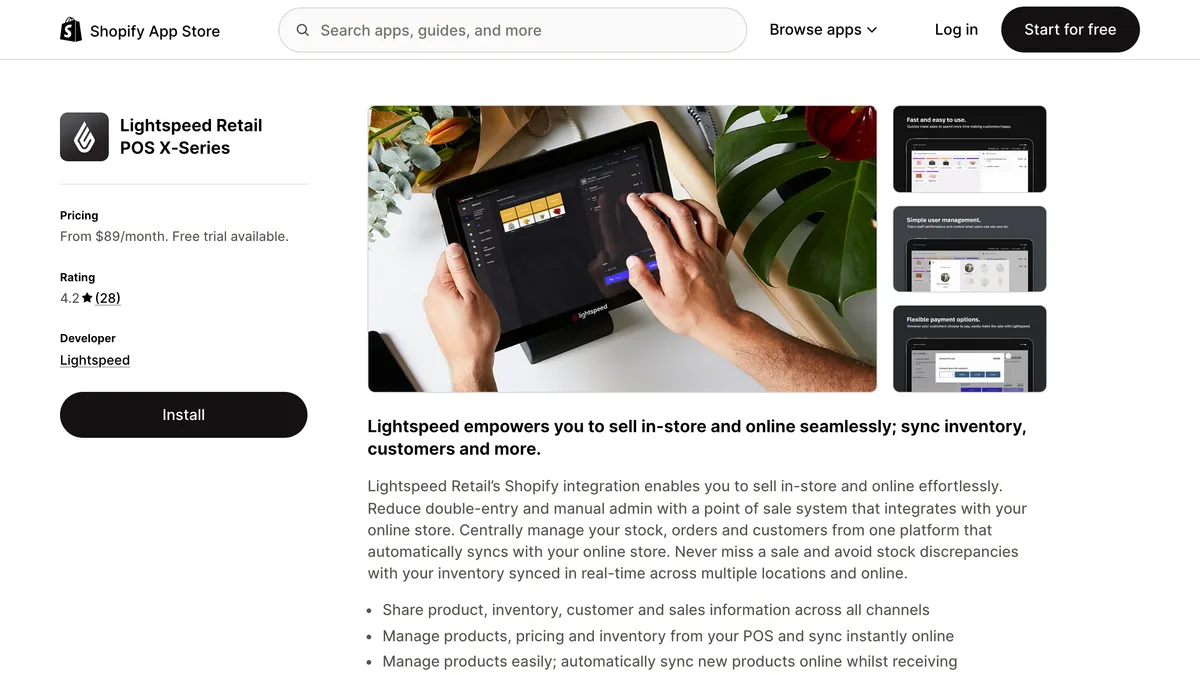
Lightspeed publishes its own Shopify app for Lightspeed Retail X-Series, which it says shares product, inventory, customer and sales information between the POS and your online store, with stock synced in real time across locations. Lightspeed's US Retail plans cost $89 (Basic), $149 (Core) or $289 (Plus) a month billed annually in October 2026, and in-store and online loyalty starts on Core.
Middleware is the other route, and it shows the decision any connected setup forces on you. The Patchworks blueprint for Lightspeed X-Series and Shopify sends stock and product data from Shopify to Lightspeed, and sales orders and customers from Lightspeed to Shopify.
Shopify becomes the place you manage products and Lightspeed the place store sales are recorded. Whichever tool you use, settle which system owns each type of data before you switch the sync on.
Which features matter whichever POS you choose?
The features that decide whether customers see one brand or two are the same on either route: inventory, customer profiles, loyalty, returns, offline selling and support for more than one location. Shopify POS handles most of them by sharing one database, while a connected POS depends on what its sync app covers.
Inventory that updates in both directions
A sale in the shop should reduce the stock the website shows, and an online order should reduce what the shop thinks it has, or you'll sell items you no longer have. Shopify POS does this by design, because the counter and the online store draw on the same inventory.
With a connected POS, check how often the app syncs, whether its plan covers your number of products and locations and what happens when a sync fails. DPL's listing, for example, includes failure alerts and manual retries for orders it sends to Square.
One customer profile across channels
Staff can only recognize an online customer at the counter if the POS can find that customer's profile and order history. On Shopify POS the profiles are shared, and POS Pro adds rich profiles with lifetime value reporting.
With a third-party POS, check whether the connector syncs customers at all: of the apps above, DPL does and SKU IQ's listing doesn't say.
Can your loyalty program work at the counter?
A loyalty program only works across channels if the app runs at the shop's checkout as well as online. Shopify POS has no points program of its own, but the main Shopify loyalty apps support it, as our Shopify loyalty program guide covers.
Plan level matters: in October 2026, Smile's free plan said it works with Shopify POS, while LoyaltyLion listed POS locations on its $199-a-month Classic plan.
With a third-party POS, look for a loyalty app that supports both systems. Marsello lists Shopify POS, Lightspeed, Clover and Heartland Retail among the platforms it works with, from $60 a month per connected site.
Without an app like that, points earned online and points earned in the shop can end up in separate programs.
Returns and exchanges across channels
Returning an online order in a shop only works if the POS can find the order, refund it and put the item back into stock. With Shopify POS, the features every plan includes handle returns at the original purchase location, and POS Pro adds returns and exchanges at any location, with exchanged items restocked at the location that processes them.
With a connected POS, a web order lives in Shopify unless the connector copies it across, so ask how a store return of an online order gets refunded and restocked.
Does the POS keep selling when the internet drops?
Shopify POS can keep taking card payments without a connection once you've turned on offline payments in version 9.14.0 or later of the app and given staff permission. It works with Shopify's card readers, including the Tap & Chip reader and POS Terminal, but not with Tap to Pay on a phone, swiped cards or manual card entry, and you might not learn that a card was declined until the device reconnects.
Cash sales can go through offline checkout without that setting. Ask a third-party POS vendor the same questions, plus one more: how the connector catches up with sales made while the POS was offline.
Support for more than one location
Multi-location support decides what each extra shop costs and how stock moves between them. As of October 2026, every Shopify plan below Plus includes 10 inventory locations, Plus includes 200 and POS Pro is priced per location. Square's paid plans are also charged per location, and each Lightspeed plan includes one register.
How does Shopify POS compare with a connected POS?
Compared with a connected POS, Shopify POS is simpler to run and cheaper to start, while a connected POS lets you keep a system your stores already depend on, at the cost of a second subscription and a sync to maintain.
| Shopify POS | Connected third-party POS | |
|---|---|---|
| Where the data lives | One Shopify account | Two systems kept in step by an app or middleware |
| Software cost, October 2026 | Included with every plan; POS Pro $89 a month per location | The POS's own plans plus a connector, such as $39.99 to $99.99 a month for DPL's Square app |
| Customer profiles | Shared with the online store | Shared only if the connector syncs customers |
| Loyalty | Shopify loyalty apps such as Smile and LoyaltyLion | An app that supports both systems, such as Marsello |
| Returns of online orders | At any location with POS Pro | Depends on whether the connector copies web orders to the POS |
| Offline card payments | On Shopify's card readers, not Tap to Pay | Depends on the POS and how the connector catches up |
| Who you call for support | Shopify | The POS vendor, the connector's developer and Shopify |
| Best suited to | Brands that sell mainly online and are adding or replacing stores | Brands whose shops already run well on another POS |
Which option suits your store?
Shopify POS is best suited to brands that started online and treat the shop as another channel of the same business, while a connected POS is a strong fit when the shops came first or run on a system you can't easily replace.
| Your situation | Better fit | Why |
|---|---|---|
| A Shopify brand opening its first shop or pop-up | Shopify POS | The shop uses the products, customers and loyalty app you already run online |
| Several stores replacing an aging POS | Shopify POS with POS Pro | One back office for every location, priced per store |
| Shops running well on Square, Clover or Lightspeed, with staff trained and hardware paid for | Keep your POS and connect it | Avoids replacing hardware and retraining staff; budget for the connector |
| A restaurant, café or appointment business with a small online shop | Keep Square or Clover | Both sell systems built for food service and appointments |
| Selling where Shopify Payments isn't available | A third-party POS | Shopify's payments and POS hardware only cover some countries |
Shopify's own case studies show brands taking the Shopify POS route. Studio McGee sold online for more than ten years, with McGee & Co. passing a million orders on Shopify, and is now opening its first owned store: a 7,500-square-foot space in Salt Lake City that will run on Shopify POS.
Shoppers there will be able to configure made-to-order furniture and have it delivered from McGee & Co.'s fulfillment center.
Outdoor retailer evo moved its online store to Shopify first, then piloted Shopify POS at its Seattle flagship before rolling it out across its US stores, with Canada following. Its resort locations in Japan, which have no ecommerce sales, sit outside the move for now.
The case for one shared system is strongest where the shops and the website serve the same customers.
Final thoughts
The right POS for a Shopify store is the one that lets a customer be the same person online and in the shop, with one stock count, one profile and one set of rewards. Shopify POS gets there with the least work because it never has two sets of records to reconcile, and for most brands that grew up on Shopify, that makes it the natural place to start.
A connected POS is a reasonable choice when your shops already depend on Square, Clover or Lightspeed. Before you commit, test the sync with real products, a return of an online order and a loyalty redemption at the counter, and agree with each vendor who fixes what when the two systems disagree.
Frequently asked questions
Is Shopify POS free?
Shopify POS is free to use with any paid Shopify plan, which started at $39 a month, or $29 a month billed yearly, in the US in October 2026. You still pay for hardware unless Tap to Pay on a phone is enough, card processing fees on each sale and $89 a month for each location that needs POS Pro.
Do you need Shopify Plus to use Shopify POS?
You don't need Shopify Plus to use Shopify POS, because every paid plan includes it and POS Pro can be added to any plan. Plus mainly changes the numbers for larger retailers: it includes 20 POS Pro locations and 200 inventory locations, against 10 inventory locations on the other plans.
Does Shopify POS work on Android and iPad?
Shopify POS runs on both iOS and Android, so an iPad, an iPhone or an Android phone or tablet can serve as your register. Shopify says most existing tablets, phones and accessories work with it, and its help center lists compatible hardware if you're keeping devices you already own.
Can you move from Square or Lightspeed to Shopify POS?
You can move from Square, Lightspeed or most other systems to Shopify POS by migrating your products and customers, but plan for your sales history to stay in the old system. In October 2026, Shopify's hardware store sold a migration service from its partner LinkToAny that moves products, customers and images from almost any POS, priced from $500 to $7,500 by data volume, and its free setup package from Accumula notes that historical data migration isn't included.
Is Shopify POS a good choice for a small store?
Shopify POS is a good fit for a small store that already sells on Shopify, because the features every paid plan includes cover card payments, customer profiles, gift cards and refunds at no extra software cost. A phone with Tap to Pay or a $49 card reader is enough to start. POS Pro becomes worth its $89 a month when you need exchanges, in-store pickup, staff permissions or inventory counts.